LMS Challenges for Frontline Employees: 12 Problems, Fixed
Quick answer
Frontline workers rarely use the company LMS. Here are the 12 LMS challenges behind low completion, and the practical fix for each one.
Most companies already have a learning management system. Most frontline employees have never used it.
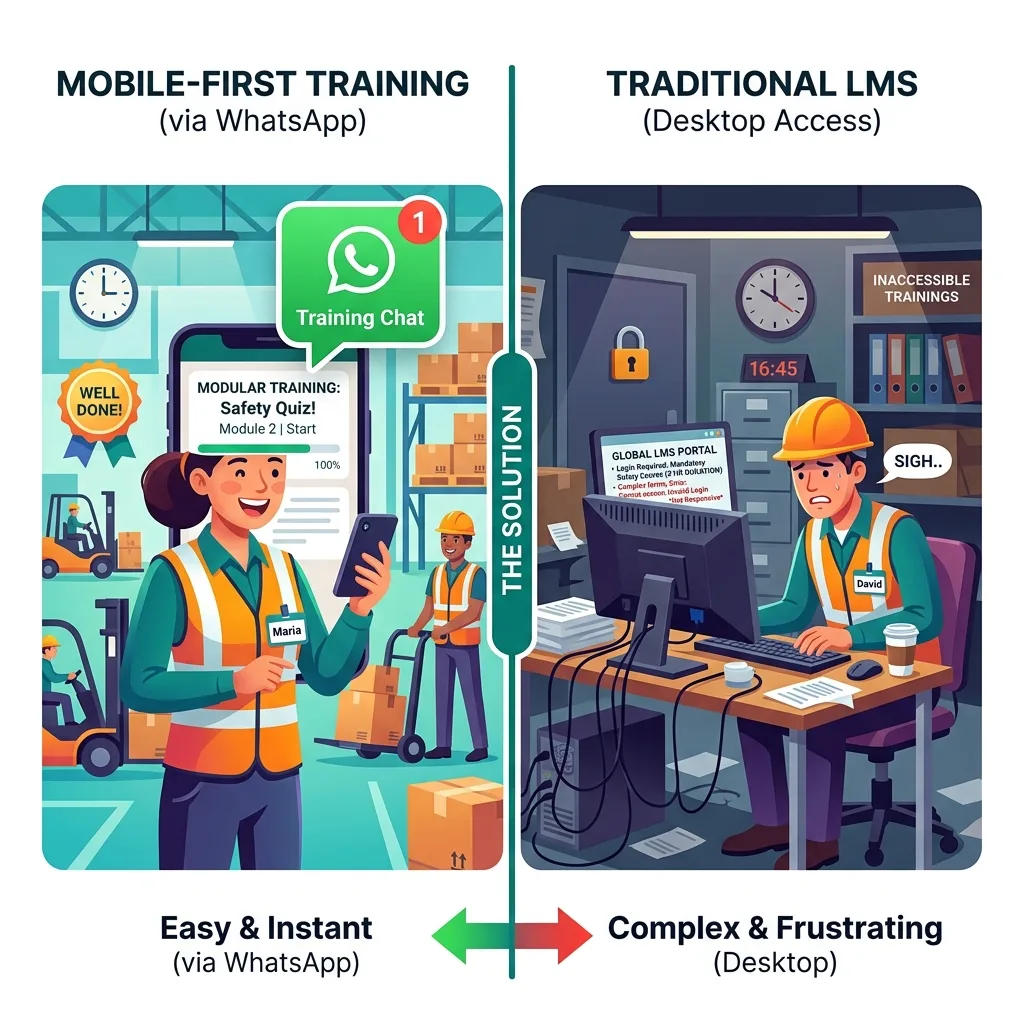
That isn't laziness, and it isn't a content problem. The LMS was designed for people who sit at a desk, have a company email address, log into a laptop every morning and can set aside 45 minutes for a course. A picker, a cashier, a field technician or a nurse aide doesn't work like that. Around 2.7 billion people, roughly 80% of the world's workforce, are deskless, according to Emergence Capital's research on the deskless workforce. The LMS was built for the other 20%.
Here are the 12 most common LMS challenges for frontline employees, why each one happens, and what actually fixes it. Some fixes work inside your existing LMS. Some don't.
1. Workers don't have a login, or can't remember it
The problem. Most LMSs authenticate with a corporate email address or an SSO account. Many frontline workers have neither. Those who do get credentials at induction forget them within weeks because they use them so rarely. Every forgotten password is a support ticket, or more often, a worker who quietly gives up.
The fix. Tie access to something the worker already has: their phone number. Magic links sent by SMS or WhatsApp, QR codes on the shop floor, or delivery directly inside a messaging app remove the login entirely. If you must keep the LMS, at least add passwordless login by phone number.
2. No company email address
The problem. Enrolment notifications, reminders and certificates usually go by email. A worker without a company inbox never sees them. Personal email addresses on file are often out of date or never checked.
The fix. Send everything to the phone. In India and many other markets, WhatsApp is the most reliable channel; elsewhere, SMS or Teams may be. Our guide to training employees without company email compares the options.
3. Yet another app to download
The problem. Mobile LMS apps help, but they introduce a new barrier: the download. Workers with older phones run out of storage. Some don't have an app store account set up. Many simply don't want another employer app on their personal phone. We've written about why frontline workers don't download employer apps.
The fix. Use a channel that's already on the phone. If an app is unavoidable, make the first lesson reachable without it.
4. Shared devices
The problem. In plants, warehouses and stores, several workers often share one tablet or kiosk. The LMS expects one person per device and session, so progress gets mixed up, people stay logged in as someone else, or nobody bothers.
The fix. Move individual training to individual phones where possible, and use QR codes at shared stations to launch short refreshers. See our guide to training workers who share a phone.
5. Content built for a laptop
The problem. Most LMS content was authored as slides for a 16:9 screen: click-next navigation, small text, drag-and-drop interactions. On a phone it becomes a pinch-and-zoom chore. Much of it is packaged as SCORM, a standard built for desktop browsers. We argued in SCORM shouldn't survive 2027 on the frontline that this format is the wrong starting point for mobile learners.
The fix. Rebuild critical content as vertical, card-based lessons designed for a phone. AI authoring now turns source documents (SOPs, policies, product sheets) into mobile lessons in minutes, so you don't have to rebuild courses by hand.
6. Courses are too long for a shift
The problem. A 40-minute course doesn't fit between tasks, and frontline workers rarely get protected training time. They start, get interrupted, and never return.
The fix. Three to five minute lessons, each with one clear objective and a question or two. Several short lessons spread across a week beat one long course on every metric. Our post on how long microlearning should be has the details.
7. Content in the wrong language
The problem. Corporate LMS content is usually in English, or in one or two major languages. A frontline workforce in India might speak eight. Workers who can't comfortably read the content either skip it or click through without understanding.
The fix. Translate critical content into the languages workers actually use, and add audio for people who'd rather listen than read. AI translation makes this fast; a native speaker who knows the job should still review safety-critical content.
8. Patchy connectivity
The problem. Video-heavy LMS modules need a stable connection for their full length. Basements, warehouses, rural sites and mobile data limits make that unreliable.
The fix. Keep lessons light: compressed images, short clips, text and audio cards that load fast on mobile data. Our low-bandwidth mobile training guide covers the techniques.
9. Nobody gets reminded
The problem. Even when workers are enrolled, LMS reminders arrive by email or as app notifications that get ignored. Completion stalls at the level of the most motivated workers.
The fix. Short, well-timed reminders in a channel workers actually read, sent when they're likely to be free (start of shift, after a break, the commute home). One good reminder beats four ignored ones.
10. Managers can't see who's done what
The problem. LMS reports are built for L&D administrators, not shift supervisors. A store manager or plant supervisor usually can't quickly see which of their people haven't completed today's safety update.
The fix. Give supervisors simple, team-level visibility: who has completed, who hasn't, who scored poorly. When supervisors can act on the data, completion rises.
11. Contractors and agency staff aren't in the system
The problem. In many plants, warehouses and retail operations, a large share of workers are on contract or come through agencies. They're often not in the HRMS, so they can't be enrolled in the LMS, so they don't get trained, even though they do the same work and face the same risks.
The fix. Choose a delivery method that works for anyone with a phone number, regardless of employment type. We cover this in training contract workers who aren't in your HRMS.
12. The pricing model punishes turnover
The problem. Many LMSs charge per seat. In frontline roles with high turnover (US retail, for example, has long run at around 60% annual turnover among frontline workers, according to McKinsey), you end up paying for seats that churn constantly, and for workers who never logged in.
The fix. Look for pricing aligned to active use rather than headcount loaded. We explained the problem in per-seat vs active-learner pricing.
The pattern behind all 12
Read the list again and a pattern jumps out. Almost none of these challenges are about the quality of the training content. They're about access, format and fit: whether the training reaches the worker, on a device they have, in a language they understand, in a length that fits their day.
That's why traditional LMS rollouts to frontline audiences typically see completion in the 20–30% range. The content might be excellent. Most workers never get to it.
Should you replace your LMS?
Not necessarily. For many organisations the right answer is to keep the LMS for what it does well and add a frontline delivery layer on top.
Keep the LMS for:
- Desk-based employees with company email and laptops.
- Long-form certification and accredited programmes.
- A system of record for compliance, if your auditors and regulators expect one.
Add a frontline layer for:
- Workers without email, laptops or app adoption.
- Short, frequent training: onboarding, SOP updates, safety refreshers, product launches.
- Contractors, agency staff, dealers and distributor teams.
Completion data from the frontline layer can flow back into the LMS or HRMS so you keep one record. Our guide to building a frontline training stack without an LMS covers what that layer needs. If you're choosing a new platform, our guide to choosing an LMS for deskless employees and best LMS for deskless workers roundup will help.
Is SMS or Teams training better than a traditional LMS?
One question in our search data asks exactly this. The honest answer: for frontline workers, delivery through a channel they already use (SMS, Teams if they have it, or WhatsApp) almost always beats a traditional LMS on reach and completion. The trade-off is that you need a platform layer that tracks who completed what, because the messaging channel on its own doesn't. Plain group messages are easy to send and impossible to audit.
Which channel is right depends on your workforce:
- WhatsApp works best where it's already the default messaging app, as in India, much of Latin America, Africa and Southeast Asia.
- SMS reaches almost any phone but supports limited interactivity.
- Teams works well for frontline workers who already have Microsoft 365 frontline licences and use the app daily.
Our comparison of WhatsApp vs SMS vs app for frontline training goes deeper.
A 30-day test to run before you decide anything
- Pick one critical module, say a safety refresher or a new SOP.
- Pick two comparable teams of 30 to 50 workers.
- Deliver the module to one team through your LMS and to the other through a mobile channel workers already use.
- Don't add extra manager pressure to either.
- After two weeks, compare starts, completions, quiz scores and support requests.
That test usually settles the argument faster than any vendor demo.
How Leap10x addresses these challenges
Leap10x is a WhatsApp-first microlearning platform for frontline and deskless workers, built around the challenges above:
- No app, no login, no company email (challenges 1 to 3). Lessons arrive on WhatsApp. SMS and QR codes cover other situations; some of these are Enterprise features.
- Mobile-native, short lessons (5 and 6). AI turns PDFs, SOPs and slide decks into three-to-five-minute story-style lessons with quizzes in about 10 to 15 minutes.
- 70+ languages with audio (7).
- Automatic reminders in the channel workers read (9).
- Real-time tracking by region, team and individual (10), with PDF certificates and CSV exports.
- Anyone with a phone number can be trained, including contractors (11).
- LMS and HRMS connections (SAP SuccessFactors, Darwinbox, Keka), REST APIs and SSO on Enterprise plans, so your LMS can stay the system of record.
Customers see completion rates of 85% and above. We're also clear about our limits: Leap10x isn't built for long-form certification courses, hands-on lab training or multi-week academic programmes, and if your workforce is desk-based with company email, a traditional LMS may suit you better.
FAQ
Why don't frontline employees use the LMS?
Mostly because of access and fit: they lack logins or company email, don't want another app, share devices, and get content designed for laptops, in the wrong language, that's too long for a shift.
How do you train frontline employees who never use the LMS?
Deliver short lessons through a channel they already use (WhatsApp, SMS or QR codes), in their language, with reminders and supervisor visibility, and feed completion data back to your LMS or HRMS.
What is the biggest LMS challenge for deskless workers?
Access. If a worker can't easily reach the training on a device they have, nothing else about the LMS matters.
Should we replace our LMS for frontline staff?
Often you don't need to. Keep the LMS for desk-based staff and long-form programmes, and add a mobile frontline layer that syncs completion data back.
CTA: Want to see the 30-day test in action? Start free for 14 days with up to 500 users, or book a demo and we'll help you set it up.
Frontline training
Training software built for deskless teams
Onboarding, SOPs, safety refreshers, and compliance evidence for workers with no corporate email and no company device — tracked by site, role, and shift.